
DEX Zero — an iPad whiteboard to draw with Claude Code and Codex
Shared whiteboard on iPad: you write, draw with Apple Pencil or speak, and Claude Code or Codex on your Mac answers by drawing on the same board.
One board, two minds: the idea behind DEX Zero
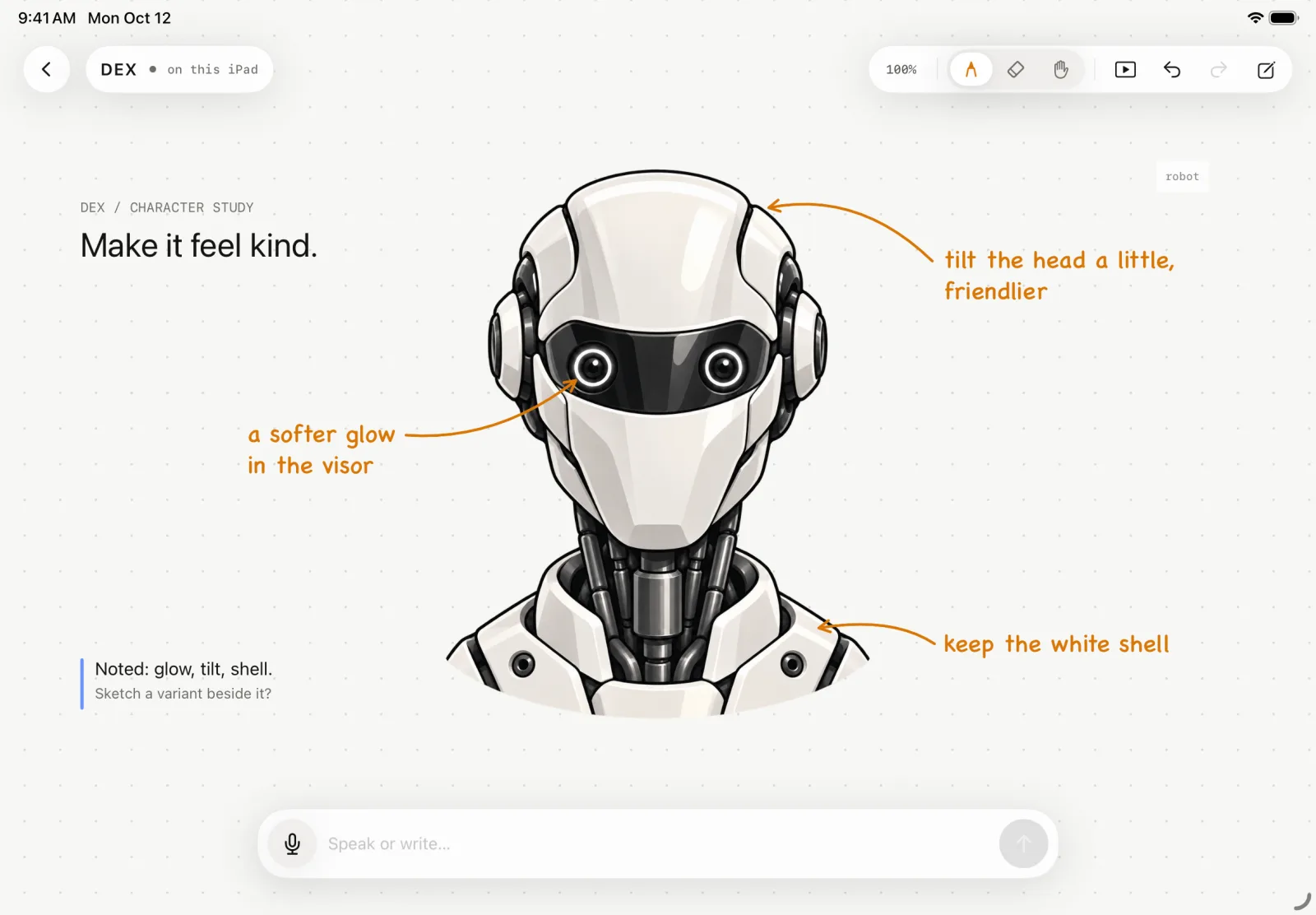
DEX Zero is a shared whiteboard on iPad. I write, draw with Apple Pencil, point and speak; a coding agent, Claude Code or Codex running on my Mac, answers by drawing on the same board: notes, vector illustrations, blocks, connections and highlights that bring the focus to what matters.
I started the project in September 2026 with one sentence as a north star: a magic whiteboard with AI to explain ideas, show what changed and clear up doubts. Coding agents are great in the terminal, but the conversation is all text, and many things are clearer when drawn: a circle, an arrow, a “this one, a little bigger”.
You bring the idea. The agent brings a second pair of hands. And everything happens where both of you can see it.
How it works: Apple Pencil, voice and an AI agent on one board
Say it. Sketch it. Point at it. I write, draw with Apple Pencil or speak. Circling an object points at it, and an arrow from one block to another becomes context for the request. Speech is recognized on the iPad itself and the note stays beside the idea. Focus requests such as “go to the server” move the camera to the object instantly, without waiting for the agent.
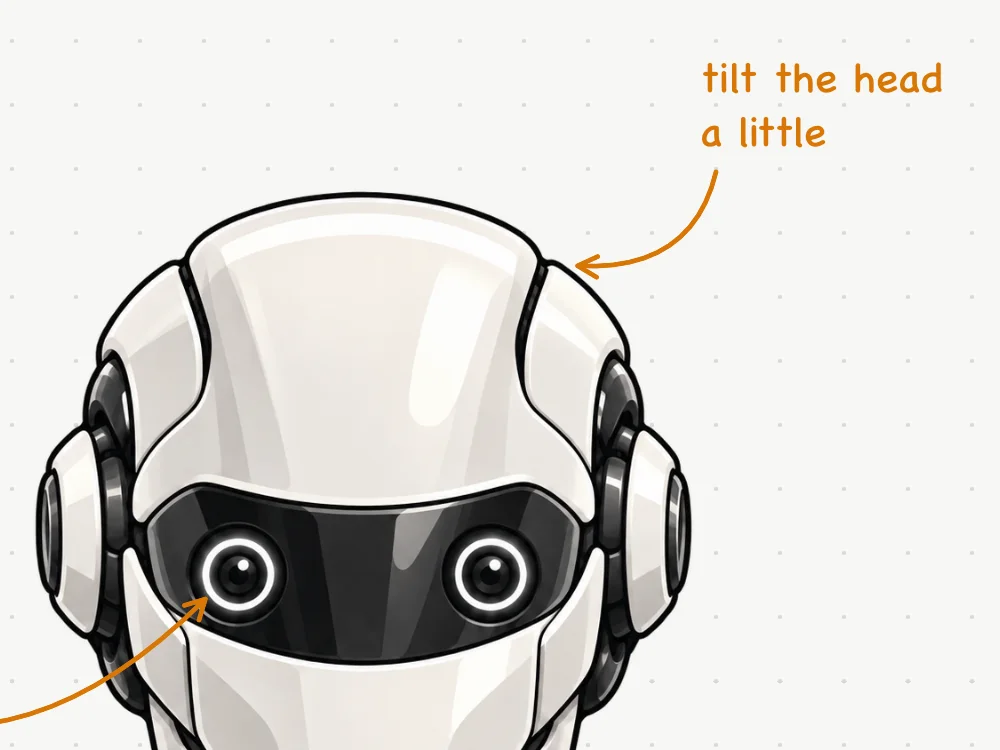
Your agent answers on the board. Claude Code or Codex, running on the Mac, receives the structured scene and an image of the board’s current state, and replies right there: a note, a sketch, a change you can undo. The answer streams in: the caption appears word by word and each object shows up as a dashed ghost before it takes shape. When a request is ambiguous, the agent asks and offers options as chips. When nothing actually changed, the app says so, instead of trusting the model’s text alone.

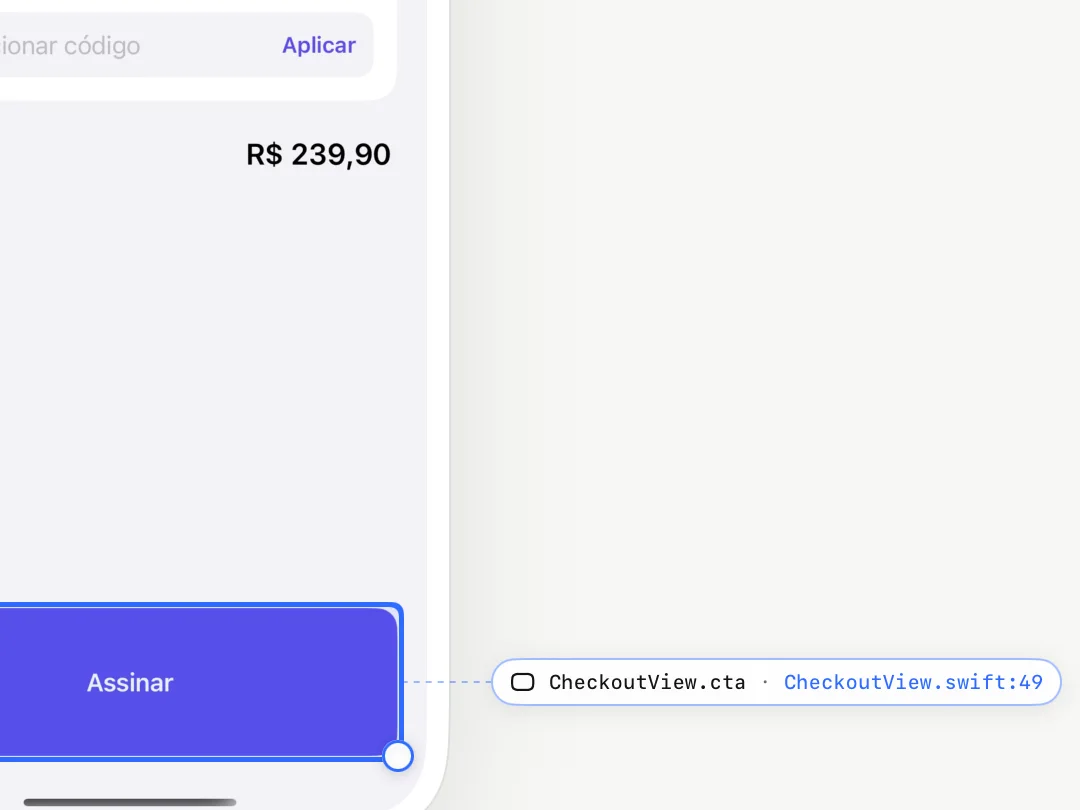
Then change the real app. In App mode, the board shows the real app running in the simulator, sliced into identified layers. With the DexTrace SDK, each layer knows the file and line of the SwiftUI view that drew it. I drag, resize, change a text or circle a layer and speak; a coding agent edits the project on the Mac, and the Hub rebuilds, relaunches the app, captures it again and verifies the result. The canvas goes from a dashed ghost to the confirmed result, with Undo always at hand.
Board replay and local .dex projects
The video above is a native replay of an interface study, recorded at 4× and cropped to the board. Every board keeps its own history on the iPad, and replay shows how the idea took shape, one change at a time, at 1×, 4× or 10×. It runs in a separate scene, leaving the current board untouched. Human strokes use PencilKit’s native points, pressure and timing; the agent’s drawings appear in the order their operations arrived, with no invented timing.
Boards are saved automatically on the device, with no DEX Zero account:
- .dex project: exports the editable board, with images, PencilKit strokes and replay, to the Files app, and opens back as a new local copy.
- PNG and PDF to share how the board looks.
- iCloud or Files backup, off by default: it only starts after you choose a folder. DEX Zero runs no backup server.
DEX Zero Hub, security and privacy
DEX Zero Hub is a small app that lives in the Mac menu bar and connects the agent I already use to the board in my hands. Claude Code or Codex run with the sign-in and plan you already have; the Hub includes neither and asks for no API key. In its settings you choose the default agent, the model and the reasoning effort.
Security and privacy are product decisions, not fine print:
- Pairing with a strong key: the iPad finds the Mac over Bonjour on the same Wi-Fi network, and the connection uses TLS with a random 256-bit key stored in the Keychain. A wrong key fails at the handshake, before any board content, and there is no plain-text fallback.
- Audio stays on the iPad: speech becomes text on the device itself, and only the transcript goes to the agent.
- No DEX Zero account and no tracking. Conversations stay under the provider account you configured.
- Protected App mode: the coding agent runs without Bash, with only file reading and editing tools. Any change outside Swift code and assets is reverted before building, and an edit that fails or is interrupted undoes itself.
- Optional refinement: a Cloudflare Worker can help interpret ambiguous navigation commands, only after activation and with consent on the iPad. It receives no audio, captures or strokes.
Native engineering: Swift 6, SwiftUI and PencilKit
I built DEX Zero end to end: product, design, protocol, the iPad and Mac apps, and the website.
- iPad app in Swift 6 and SwiftUI, with PencilKit for ink and the Speech framework for voice, always on device, never through a server.
- DexWire, a custom JSONL scene-operations protocol with an incremental parser. It is what lets an object appear while the answer is still arriving: the agent appends vector elements in batches and edits only what changed, with stable IDs.
- Live context: Pencil points reach the Mac in 40 ms batches and the partial transcript already updates the context, without spending a model call per point or word.
- DEX Zero Hub in Swift, with Network.framework and TLS, a pre-warmed agent process to shorten the first turn, and integration with the Claude Code CLI and the Codex App Server.
- DexTrace, a Debug SDK that maps each view of the target app to its file and line. In Release, it does nothing.
- Website in Next.js on Vercel and optional refinement on a Cloudflare Worker, which keeps provider keys off the devices.
DEX Zero status and what comes next
On October 12, 2026 the product was renamed from DEX to DEX Zero, so it would not be confused with Samsung DeX. The official website is dexzero.app.
- Hub for Mac 0.1.2 is published on GitHub, with secure pairing. It requires macOS 14 or later and Claude Code or Codex installed and signed in.
- DEX Zero 0.1.3 for iPad is prepared for App Store submission and is not published yet. It requires iPadOS 17 or later; Apple Pencil is recommended.
- In this version, the interface and speech recognition are in English. Typed text and board content can be in any language.
Next steps: the App Store release, QR code pairing, a voice language picker and Stage, a third surface in development for editing web pages, HTML artifacts, images and videos from the Mac with the same logic as the board. To talk about the project, reach me on the contact page.